
Autorun Manager - Get APK
You'll be able to download in few seconds.
Publisher Description

Do you want to have control over automatically starting applications?
Autorun Manager (formerly Autorun Killer) is an ultimate tool that lets you
disable all the autostarting apps you don't need
. Unfortunately this app is misunderstood many times so please read help carefully and/or mail the developer if you have questions.
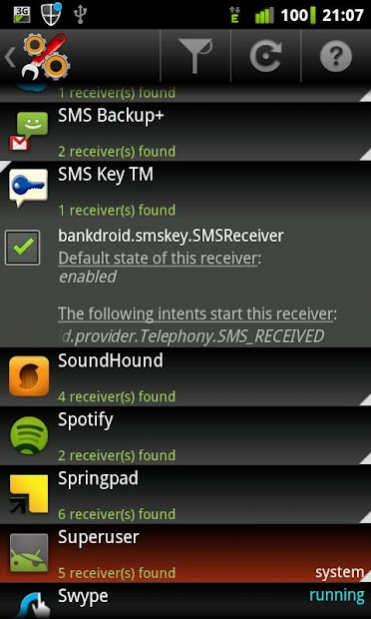
There are many applications that automatically start when you turn on your device; many of these you don't use or need, they just consume your valuable resources. This app sports a basic mode for the regular users and an advanced mode for power users with rooted devices.
Autorun Manager in
basic mode
lets you manage applications that start up when you boot your device. Applications are terminated right after they start, but if the application is programmed to restart itself this can fail. Please note that some applications are written so that they cannot be stopped because of the android system design. These kind of applications are marked as 'self-restarter' and are better to be left enabled.
In
advanced mode
you gain control over all the system-wide events and enable-disable application starts. This is the ultimate solution to control what you want to be started, but you also can break apps, so this feature is
only for experienced users with rooted devices
.
PRO key app
is available on the market!
Donators and PRO users receive
additional features
:
- no ads
- basic mode's prevent restart feature is selectable
- can block more than 10 receivers in advanced mode
- Chuck Norris mode enabled
- application freezing
If you have questions or face any problems please write me a mail.
-- MobiWIA - a cooperation with EclipSim --
About Autorun Manager
The company that develops Autorun Manager is MobiWIA Kft.. The latest version released by its developer is 1.0 .
To install Autorun Manager on your Android device, just click the green Continue To App button above to start the installation process. The app is listed on our website since 2022-03-16 and was downloaded 0 times. We have already checked if the download link is safe, however for your own protection we recommend that you scan the downloaded app with your antivirus. Your antivirus may detect the Autorun Manager as malware as malware if the download link to com.rs.autorun is broken.
How to install Autorun Manager on your Android device:
- Click on the Continue To App button on our website. This will redirect you to Google Play.
- Once the Autorun Manager is shown in the Google Play listing of your Android device, you can start its download and installation. Tap on the Install button located below the search bar and to the right of the app icon.
- A pop-up window with the permissions required by Autorun Manager will be shown. Click on Accept to continue the process.
- Autorun Manager will be downloaded onto your device, displaying a progress. Once the download completes, the installation will start and you'll get a notification after the installation is finished.
Program Details
System requirements
Download information
Pricing
Version History
version
posted on 2022-03-16
Better compatibility with Android O and P
version
posted on 2017-03-15
4.3.97:
- one less permission needed
- added privacy policy
- update to android N
version
posted on 2016-02-18
4.3.96:,-Android M Basic mode fix,-improved reliability,4.3.95:,-Android M compatibility,-privacy statement added,4.3.94:,-experimental Android 5.0 (Lollipop) support,-better start up time and other performance improvements,4.2.91:,-disable all bugfix (PRO), sorry for the mistake,4.2.90:,-fix: duplicates when filtering receivers,-way better root handling,-4.4 compatibility,-optimizations,-updated libs
version 2.0.5
posted on 2011-01-28
Several fixes and updates
Disclaimer
External Download
We do not host Autorun Manager on our servers. We did not scan it for viruses, adware, spyware or other type of malware. This app is hosted by Galad and passed their terms and conditions to be listed there. We recommend caution when installing it.
The APK Download link for Autorun Manager is provided to you by apps112.com without any warranties, representations or guarantees of any kind, so access it at your own risk.
If you have questions regarding this particular app contact the publisher directly. For questions about the functionalities of apps112.com contact us.
